
Vibecoding is coding with flow, intuition, and AI as your creative partner. If you’ve ever wished building apps could feel less rigid and more like “creating something alive,” then vibecoding is your lane.
You type normal sentences like “make a shopping app with Nigerian colours” and Gemini creates the full code instantly.
In this guide you’ll build a real Nigerian e-shop from scratch. You’ll connect Firebase, deploy to Google Cloud, and start taking Paystack payments. All in plain English.
And also In this guide, I’ll walk you through how to build a full app using Google AI Studio, connect it to a backend with Firebase, deploy it via Google Cloud, and even accept payments using Paystack.
What is Vibecoding?
Vibecoding is a modern approach to development where you rely heavily on AI tools to generate, refine, and iterate your code. Instead of stressing over syntax, you focus on intent. You describe what you want and AI helps you build it.
Vibe coding is Google’s fun way of building apps. You chat with Gemini like a friend. Describe what you want. It writes the code for you.
Why Vibecoding is Gaining Popularity among Nigerians in 2026
Think about it: why spend hours debugging when AI can suggest fixes instantly? Vibecoding speeds things up, lowers the barrier to entry, and lets beginners build like pros.
Why Google AI Studio Wins for Vibe Coding in Nigeria in 2026
Google AI Studio stands out because it’s:
- Completely free to start
- Super fast with Gemini 3.1 Pro Preview
- Remembers your whole project
- Works right in your browser
You get real-time changes and zero setup headaches. No other tool feels this smooth. Thousands of Nigerians are already vibecoding side hustles. You can too.
Setting the Stage: Tools You’ll Need
Before we start prompting, we need a basic toolkit. You won’t need a high-end setup; in fact, many creators are doing this entirely from their mobile devices or basic laptops.
- A Google Account: To access AI Studio and Firebase.
- Firebase: This will be your database and hosting provider.
- Paystack Account: To handle the money (specifically for African markets, though the logic applies to Stripe or PayPal).
Introduction to Google AI Studio
Google AI Studio is a powerful environment where you can experiment with AI models, generate code, and build intelligent features quickly. Key Features of Google AI Studio
- Prompt-based coding
- Real-time testing
- Integration-ready outputs
- Fast prototyping
Getting Started with Vibe Coding on Google AI Studio in 5 Minutes
- Go to aistudio.google.com
- Sign in with your Google account
- Click “Build”
- That’s it. You’re ready to start vibing.
Grab the Free Notion Template – Follow Along Hands-On
Duplicate this free Notion template to get everything in one place:
- Ready-to-copy prompts
- Step-by-step checklists
- All code snippets
- Progress tracker
- Firebase & Paystack setup sheet
Click here to duplicate the Notion template
Open the template in a new tab, keep Google AI Studio open, and follow along. It makes the entire guide 10× easier and more practical.
Choose the Perfect Beginner Project:
We’re building a clean Nigerian digital store with paystack to sell e-books and courses. Customers add items to cart. Pay with Paystack. Orders save automatically. Why this project? It teaches everything in one go — frontend, backend, payments, and deployment.
How to Build the Frontend with Vibe Coding on Google AI Studio
Open your project in Google AI Studio.
Paste this exact prompt:
“Create a complete React 18 + Vite + Tailwind e-shop for Nigeria. Mobile-first design. Use green and yellow Nigerian flag colours. Include hero section, product grid from Firebase, floating cart, and smooth animations.”
Gemini gives you every file instantly. Your store looks professional in minutes.
Add Cart and Animations
Next prompt:
“Add a slide-in cart with Framer Motion and save items in localStorage.”
Done. Your app now feels alive.
Phase 2: The Backend – Setting Up Firebase
Your app needs a brain and a memory. If a user signs up, where does that information go? That’s where Firebase comes in. Owned by Google, it’s a “Backend-as-a-Service” (BaaS) that handles the heavy lifting like databases and user logins so you don’t have to build a server from scratch.
Go to the Firebase Console and create a new project. You’ll want to enable two specific things:
- Firestore Database: To save user information and app data.
- Authentication: To allow users to sign up via email or Google.
Introduction to Firebase
Firebase gives you authentication, database, hosting, and serverless functions – all in one place.
Setting Up a Firebase Project
- Go to Firebase Console
- Create a new project
- Enable Firestore
- Enable Authentication
Phase 3: Connecting Firebase to Your App
This is where the frontend meets the backend.
Authentication Setup
Use Firebase Auth to allow users to sign up/login with email or Google.
Firestore Database Integration: Store user data, chat history, and transactions in Firestore. Think of it as your app’s memory.
Now we need the frontend and the backend to start talking. In your Firebase project settings, you’ll find a “Firebase SDK snippet.” It looks like a bunch of technical jargon, but it’s actually the “secret handshake” your app needs to communicate with Google’s servers.
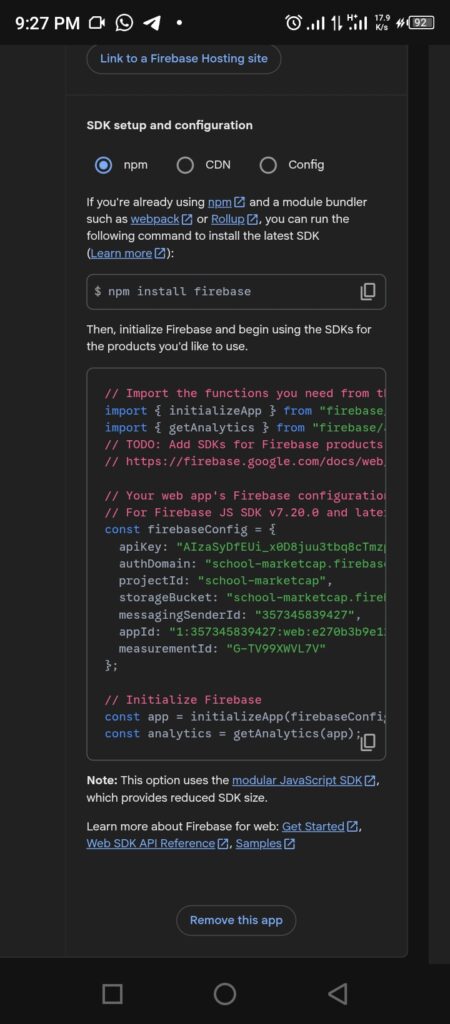
Copy that snippet and give it to Google AI Studio.
Say: “Here are my Firebase config details. Please integrate them into the frontend code you just wrote so the ‘Sign Up’ form actually works and saves data.” The AI will rewrite your code, inserting the connection logic exactly where it needs to be. It’s like having a master plumber connect your house to the city’s water line while you just watch.
Managing API Keys Safely
Warning: Your API keys are like the keys to your house. You don’t leave them taped to your front door. While we are keeping things simple for this beginner guide, eventually, you’ll want to use environment variables to hide these keys. For now, just remember: never share your full code publicly if your actual Firebase keys are visible inside it!
Phase 4: Integrating Paystack
What’s a great app if it doesn’t have a way to sustain itself? Paystack is a fantastic payment gateway that allows you to accept payments via cards, bank transfers, and mobile money.
Once you sign up for Paystack, grab your “Public Key” from the dashboard. This is what tells Paystack where to send the money when someone clicks your “Buy” button.
The Paystack Inline Javascript Approach
This is the “Easy Mode” of payments. You don’t need to build a complex checkout system. Ask Google AI Studio:
“I want to add this Paystack script in my HTML <head><script src=”https://js.paystack.co/v1/inline.js”></script>Paystack Inline. When a user clicks the ‘Premium’ button, a payment popup should appear for 10,000 Naira. Use my public key [Insert Your Key] and call a function that updates the user’s status to ‘Paid’ in Firebase after a successful transaction.”
The AI will generate a small script that handles the entire checkout flow. When the user pays, Paystack sends a “success” signal, and the AI-generated code will then update your database automatically.
Deploying Your App to Google CloudTime to go live.
Hosting on Google Cloud
Deploy your app using Google Cloud. Inside the Google AI studio, Click on the publish button. Follow the steps to create a cloud account and then deploy the app.
Best Practices for Vibecoding Projects Performance Optimization
- Minimize API calls
- Cache responses
- Optimize images and assets
Security Tips
- Use environment variables
- Validate user inputs
- Protect API keys
Common Mistakes Beginners Make
- Overcomplicating the UI
- Ignoring backend security
- Not testing payment flows
- Relying blindly on AI without reviewing code
Advanced Vibecoding Tricks for Nigerian Apps
- Save your best prompts for reuse
- Add GitHub for version control
You’ll level up fast.
What “The Vibe” Looks Like in the Wild
It’s one thing to talk about AI theoretically; it’s another thing entirely to see it functioning in the real world. To give you an idea of how this workflow scales, I’ve used these exact methods to move from “blank screen” to “active platform” across several different domains.
Here is a look at how vibecoding actually manifests when you apply it to specific problems:
1. The Educational Ecosystem (AI Paddi)I wanted to bridge the gap between complex AI concepts and everyday users. Using Google AI Studio, I vibecoded AI Paddi, which isn’t just one app but a suite of tools including an AI literacy platform and a specialized toolhub.
The Vibe: “Create a centralized hub where users can find and learn about AI without needing a PhD in Computer Science.”
The Result: A functional, multi-platform ecosystem that handles user education and resource discovery, built and maintained almost entirely through natural language prompts.
2. Social Impact & Accountability (Borno School Monitoring)
Infrastructure tracking is a massive logistical headache. I used the same Firebase + Google Cloud stack mentioned earlier to build a digital accountability ecosystem.
The Vibe: “Build a secure way to track teacher engagement and educational infrastructure that works in low-bandwidth environments.”
The Result: A monitoring platform that transforms raw data into actionable insights for stakeholders, proving that vibecoding can handle “serious” data just as well as consumer apps.
3. Merging Culture with Tech (Owambe Stylist AI)
Not all apps have to be about spreadsheets or literacy, some are just about style. I experimented with virtual try-on technology for traditional attire.
The Vibe: “Let users see how they would look in traditional ‘Owambe’ outfits using AI-driven image generation.”
The Result: A fashion-tech prototype that uses complex image processing to help people visualize their style before they even hit the tailor.
Why Share This?
I’m not sharing these to brag or to sell you a subscription. I’m sharing them because I built all of this using only my Android phone. I didn’t have a high-end laptop or a degree in software architecture. I just had a clear vision and the ability to “talk” to the AI.
If these projects can come to life through a mobile screen and a few well-placed prompts, imagine what you can build with the tools you have right now. The barrier isn’t your hardware or your bank account; it’s just the first prompt.
Conclusion
Vibecoding flips the traditional coding experience on its head. Instead of getting stuck in technical weeds, you focus on building ideas fast. With tools like Google AI Studio, Firebase, Google Cloud, and Paystack, you can go from idea to live product faster than ever. The key is to start simple, iterate fast, and let AI amplify your creativity not replace your thinking.
FAQs About Vibecoding on Google AI Studio for Nigerians
1. Do I need coding experience to start vibecoding?
Not really. Basic understanding helps, but AI tools guide you through most of the process.
2. Is Firebase free to use?
Yes, it has a generous free tier, but costs can increase as your app scales.
3. Can I use Paystack outside Africa?
Paystack is primarily focused on African markets but supports international payments.
4. How secure is Google Cloud deployment?
Very secure—just make sure you follow best practices like environment variables and authentication.
5. How do Nigerians improve Vibecoding skills fast?
Practice one new prompt every week. Focus on Nigerian colours, Naira, and Paystack. You’ll be building pro apps in no time.